Chiropractic patient education videos come in two kinds: a rented library of general topics, or short films made about your own clinic. Rent a library if you need many topics on the waiting-room screen this month and never plan to post them; choose films made for your clinic if you want your doctor's name, your equipment and your town on screen, and the right to use them anywhere.
We are ChiroVant. We make short videos for clinics like yours: 183 films built for chiropractic clinics so far, and 41 clinics with films made for them. This guide quotes one library's license, lists what to loop on the lobby TV, and shows how to set up the screen so patients can follow a film with the sound off.
Table of Contents
- → Should I Rent Chiropractic Patient Education Videos or Own Them?
- → Can I Post Library Videos on Facebook, Instagram or YouTube?
- → What Should Play on the TV in My Waiting Room?
- → Can I Play Our Instagram Reels on the Waiting Room TV?
- → What Do Other Clinics Put in Their Own Chiropractic Patient Education Videos?
Should I Rent Chiropractic Patient Education Videos or Own Them?
Decide by where each film has to play and what stays yours after you stop paying. A library puts dozens of topics on screen today. Films made for your clinic come one service at a time, but they show your equipment and name your doctor and your town, and you can agree up front that they are yours to post.
Five differences usually decide it:
- Topics. A library has dozens of subjects ready on day one. Your own films arrive one service at a time, so the screen fills more slowly.
- Whose clinic is on screen. On most of the library pages we read, customization means adding your logo, name, phone number or your own clips around their general films. A film made for you names your doctor and shows your room and your equipment.
- What it shows. A library can include techniques and devices you do not use. A looped film about an instrument or a table you do not have invites questions your front desk cannot answer.
- Where it may play. Some library licenses stop at the waiting room and your website. That is the next question below.
- What stays when you stop paying. A rented library usually leaves with the subscription. Films you commissioned can stay, if the terms say so in writing.
Here is the difference in one example. A general library film about low back pain explains the condition to anyone, in any town. A film made for your clinic opens on your own table, uses the words your patients use for the problem, and ends on your doctor's name, your town and your phone number. Our chiropractic video ads playbook covers the paid side of the same kind of film, and if decompression is your main service, read showing the decompression mechanism instead of a promise.
Want us to do this for your clinic?
Before you rent a library, see one film about your own service. Get a quote: we send a clear monthly price for your clinic's videos within one business day. There is no obligation and no contract: you decide after you see the price.
Get a quote →Can I Post Library Videos on Facebook, Instagram or YouTube?
Only if the license for your chiropractic patient education videos says so, and the one we read says no. ViewMedica's streaming terms, effective April 13, 2025, grant use "for your internal use only during your active subscription period" and say you may not "Upload ViewMedica videos to third-party platforms like YouTube, Vimeo, or social media."
The same ViewMedica streaming terms do let subscribers display the videos on their own business website, and when the subscription ends they require you to "remove any embedded or downloaded ViewMedica content from your systems and marketing materials." That is one vendor's terms, not every library's, so read your own before you plan a feed around them. Ask the vendor these five questions, and get the answers in writing:
- May I upload the videos to my Facebook, Instagram or YouTube accounts?
- Can I download the files, or only stream them through your player?
- What do I have to remove when I cancel, and by when?
- Is the music in the videos cleared for playing in a business?
- Can my own doctor, logo or town appear inside the film, not only around it?
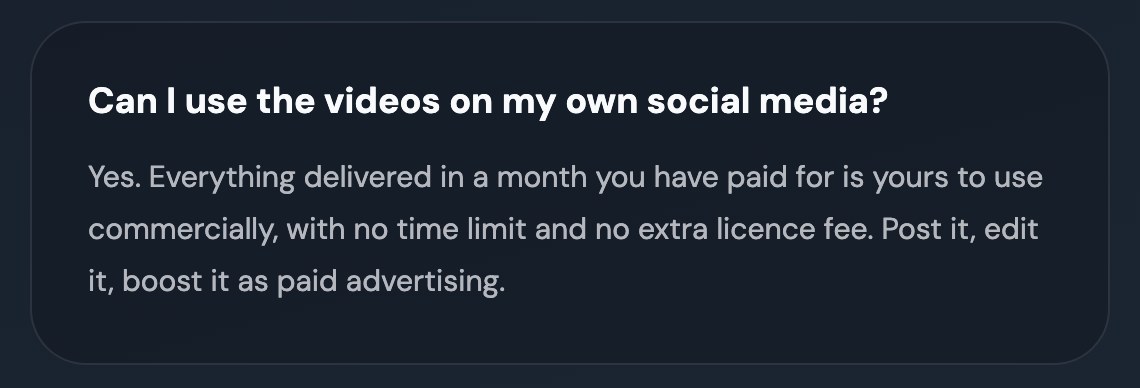
For comparison, our own answers on the questions clinic owners ask us say: "Everything delivered in a month you have paid for is yours to use commercially, with no time limit and no extra licence fee." And if you cancel: "Videos already delivered stay yours." Ask the same question of anyone you hire to run your feed: our guide to social media marketing for chiropractors says the page, the handles and the content library should be yours.
What Should Play on the TV in My Waiting Room?
The best chiropractic patient education videos for a lobby are short films that answer the questions patients already ask your front desk: what happens at a first visit, what a session on your equipment looks like, how to book the next one. Caption each film for a muted screen, show only services you offer, and never promise a result.
- For one week, have the front desk note every question patients repeat.
- Make one short film per question, rather than one long reel that covers everything.
- Burn the captions into the picture, large enough to read from the farthest chair.
- Check each film with the Patient Education Materials Assessment Tool (PEMAT), which has a version for audiovisual materials. The higher the score, the easier the film is to understand and act on. Its developers (Shoemaker, Wolf and Brach, 2014) used 70% as the cut-off when they tested the tool, so aim above it.
- Take out any film about a technique or device you do not offer.
- Keep testimonials and outcome claims out of the loop entirely.
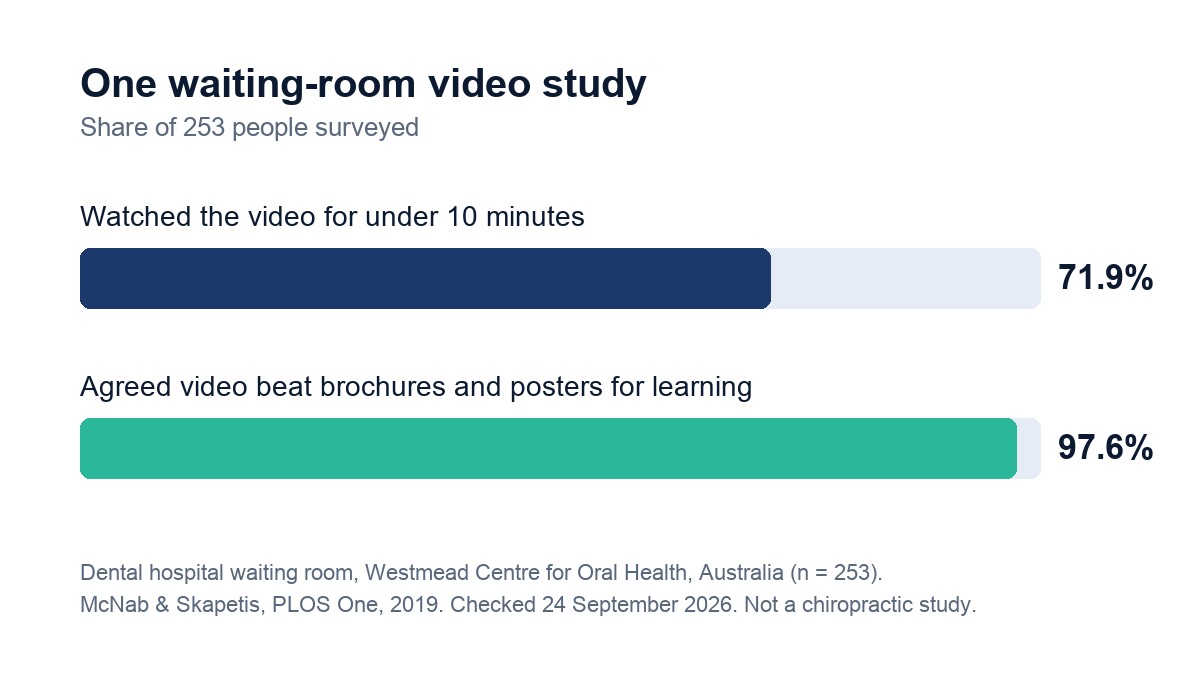
There is little research on waiting-room video, and none we found in chiropractic. The closest is a study from a dental hospital waiting room in Australia (McNab and Skapetis, PLOS One, 2019, 253 people surveyed). In that study, 97.6% agreed that video was better than brochures and posters for learning. But 71.9% watched the video for less than 10 minutes, and several said the volume was too low to hear the messages. Short films fit a short wait, and burned-in captions get around a quiet screen.
If you are not sure which questions come first, start with answering the questions patients ask before they call.
Can I Play Our Instagram Reels on the Waiting Room TV?
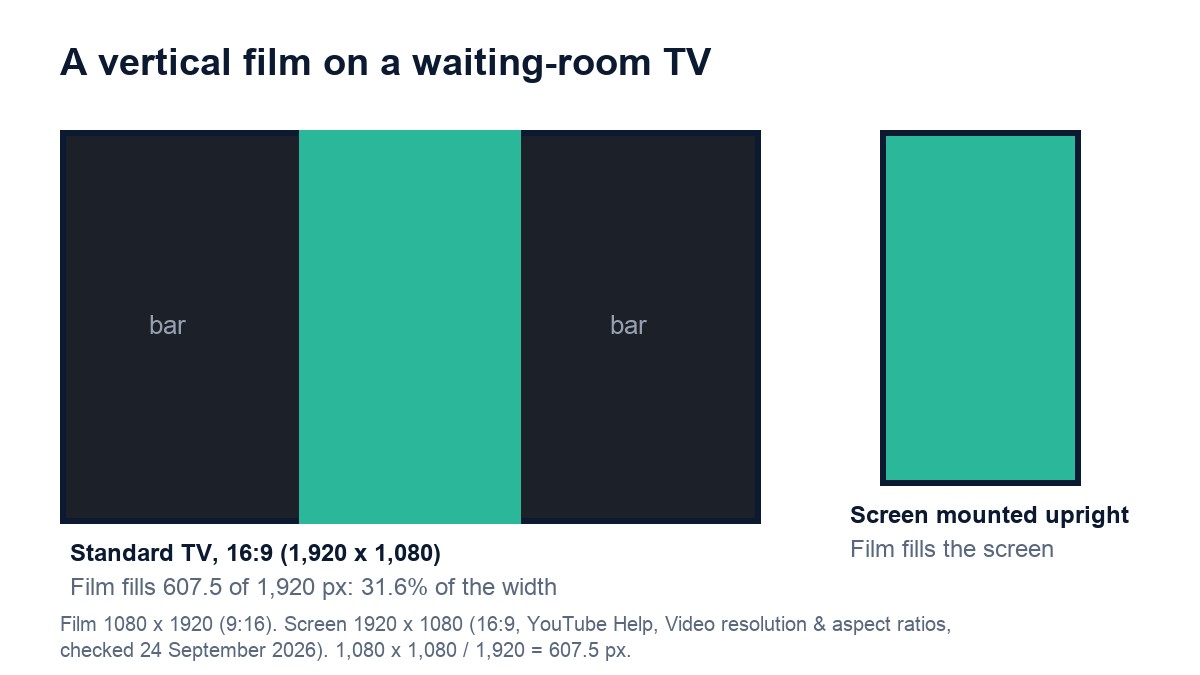
Yes, after three checks. Reels are vertical, 9:16, while a standard TV is landscape, 16:9, so a Reel fills about a third of the screen's width unless the screen hangs upright. Play your own downloaded files from a local player, not the YouTube app, and keep the sound off unless the music is cleared for a business.
The shape of the screen
A vertical film is 1,080 pixels wide and 1,920 tall. On a 1,920 by 1,080 television it is scaled to 1,080 pixels tall, which makes it 607.5 pixels wide: 31.6% of the screen's width, with dark bars either side. YouTube's help page on aspect ratios, checked in September 2026, gives 16:9 as the standard on a computer and describes padding for 9:16 vertical video. You have three options: mount one screen upright, ask whoever made the films whether they can supply landscape versions of the ones you want to loop, or accept the bars.
The player
YouTube's Terms of Service, effective December 15, 2023, bar using the service to view or listen to content other than for personal, non-commercial use, and give the example that "you may not publicly screen videos or stream music from the Service." So even for your own uploads, download the files and play them from a USB stick, a local media player or a signage app that plays your own files.
The sound
In a waiting room the TV competes with conversation and the phone, so captions carry the message. If you want sound, get written confirmation from whoever made the film that its music is cleared for playing in a business. Until then, run it muted. For the feed side of the same films, see our chiropractic social media post ideas.
What Do Other Clinics Put in Their Own Chiropractic Patient Education Videos?
Their own services, usually one per film. The 183 films built for chiropractic clinics include spinal decompression on the clinic's own table, shockwave, laser therapy and the car-crash patient who felt fine at first. Owners then correct the things a library never has to get right.
One service, one patient, one film
Before a film is written, the owner answers one question from us, such as which service the film should be about, or whether it is for the patient who was just hurt or the one who feels fine and wants to feel better. That answer becomes the film's line. A clinic with several services gets a short series, each film opening differently, rather than one crowded film that tries to cover everything.
What owners correct
Owners correct how the voice over says their town and their doctor's name, and what their equipment looks like on screen. One owner told us the laser in his films gave off smoke and did not look like the one he uses. We rebuilt those shots from the pictures he sent of what his laser looks like, because a therapy laser does not smoke.
Why the films work with the sound off
Captions are burned into the picture one or two words at a time, in bold white with the key word in the clinic's color, inside a safe zone away from the edges. The logo sits in a small corner chip and the doctor's name appears as a lower third. That was designed for phones scrolled in silence, and it is exactly what a muted waiting-room screen needs.
What the films never say
The doctor checks, explains and treats; relief is shown, never promised. Devices do only what the real device does. Every film ends by naming the doctor as the one to call, with the clinic's logo and phone number on the end card, and offers an answer, not an outcome. One owner asked us what to do with his film once it arrived. Our answer was the feed first, and a loop on the waiting-room screen second.
Want us to do this for your clinic?
Pick the service patients ask about most. Ask us for a quote and we will tell you what a monthly set of short captioned films about it would cost for your clinic, within one business day.
Get a quote →Your next step takes a week. Send any library vendor the five questions above, and have your front desk list every question patients repeat. The vendor's answers show what a rental lets you do. The top question on that list is where your own chiropractic patient education videos should start.